The Unseen Pitfalls of Keyboard Shopping
Many users report that up to 90% of those who purchase a new keyboard experience significant buyer's remorse within three months. The market is saturated with options that promise ergonomic bliss or gaming supremacy, yet often deliver nothing but frustration and a lighter wallet.
It's a common scenario: you unbox a sleek new mechanical keyboard, excited by its promise of tactile feedback and lightning-fast response. Yet, within weeks, keys start sticking, the build feels flimsy, or the touted 'satisfying click' becomes an unbearable racket. This isn't just bad luck; it's often the result of overlooking crucial details.
Why Do Keyboard Purchases Fail? Common Patterns
Understanding the common pitfalls can empower you to make an informed decision. Here are some recurring issues that lead to keyboard buyer's regret:
- Ephemeral Switch Life: Many budget mechanical keyboards cut corners on switch quality. While they might feel good initially, the switches quickly degrade, leading to inconsistent actuation or complete failure long before their advertised lifespan.
- Ergonomic Misery & Fatigue: A keyboard might look impressive, but if its layout, keycap profile, or lack of adjustable feet don't align with your typing style, it can lead to hand and wrist strain during extended use. The wrong angle or keycap sculpt can be surprisingly detrimental.
- Connectivity Catastrophes: Flimsy, non-detachable cables are a common point of failure. A frayed cable can render an otherwise functional keyboard useless, and replacing it can be difficult or impossible.
- Build Quality Betrayal: What appears to be robust in pictures can often turn out to be cheap, flexy plastic in reality. A poor build quality impacts not only durability but also the overall typing feel and acoustic profile of the mechanical keyboard.
- Limited Customization & Repairability: Many users discover they dislike their chosen switch type or want to upgrade their keycaps later. Non-hot-swappable boards or those with proprietary keycap sizes severely limit future customization and repair options, locking you into a potentially suboptimal experience.
The Essential Mechanical Keyboard Verification Checklist
Before you commit to a purchase, consult this comprehensive checklist. These criteria focus on concrete specifications and features that directly impact performance, durability, and user satisfaction.
| Verification Criteria | Specifics to Check |
|---|---|
| 1. Switch Type & Lifespan | Look for reputable switch brands (e.g., Gateron, Cherry MX, Kailh or equivalents) with a specified lifespan of at least 50 million keystrokes. Consider linear (smooth, quiet), tactile (bump), or clicky (audible click) based on preference. |
| 2. Hot-Swappability | Confirm if the PCB supports hot-swappable switches (3-pin or 5-pin). This allows for easy switch replacement or experimentation without soldering, extending the mechanical keyboard's versatility and lifespan. |
| 3. Key Rollover & Anti-Ghosting | Ensure the keyboard offers N-Key Rollover (NKRO) or 100% Anti-Ghosting. This guarantees every key press registers accurately, even when multiple keys are pressed simultaneously. |
| 4. Keycap Material & Profile | Prioritize PBT double-shot keycaps for superior durability and legend longevity over thinner ABS keycaps. Consider ergonomic profiles like OEM, Cherry, or DSA. |
| 5. Connectivity & Cable Quality | Check for a detachable USB-C cable, preferably braided, for enhanced durability and portability. Avoid keyboards with fixed, thin cables. |
| 6. Form Factor & Layout | Choose a form factor that suits your workflow (e.g., 87-key Tenkeyless (TKL) for a balance of features and desk space, 60% for portability, Full size for data entry). Verify standard key sizes for easy keycap replacement. |
| 7. Build Materials & Stabilizers | Look for a sturdy base (ABS plastic or aluminum) with minimal flex, an internal steel or aluminum plate, and well-lubricated stabilizers (for spacebar, shift, enter) to prevent rattle and ensure smooth key presses. |
Applying the Checklist: A Real-World Comparison
Let's apply these criteria to a common mechanical keyboard specification often found in the market. This specific product is designed for both gaming and office use, prioritizing a quieter operation and customization.
| Verification Criteria | Product Specification | Pass/Fail | Notes |
|---|---|---|---|
| 1. Switch Type & Lifespan | Gateron-style linear switches, rated for 50 million keystrokes. Designed for quiet operation. | Pass | Meets lifespan requirement; 'quiet' implies a desirable characteristic for many users. |
| 2. Hot-Swappability | Fully hot-swappable PCB, supporting both 3-pin and 5-pin switches. | Pass | Offers excellent customization and repair potential. |
| 3. Key Rollover & Anti-Ghosting | N-Key Rollover (NKRO) across all 87 keys. | Pass | Ensures every key press registers without issue, critical for gaming and fast typing. |
| 4. Keycap Material & Profile | PBT double-shot keycaps, OEM profile. | Pass | Superior durability and resistance to shine compared to ABS; standard profile for comfort. |
| 5. Connectivity & Cable Quality | Detachable USB-C cable, braided design. | Pass | Enhances durability and makes the mechanical keyboard more portable. |
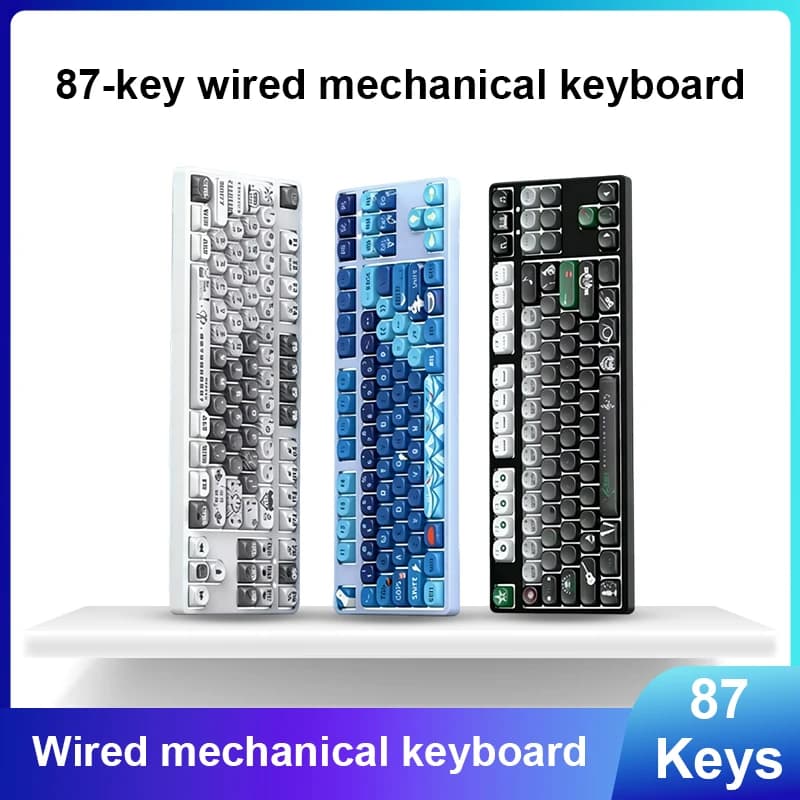
| 6. Form Factor & Layout | 87-key Tenkeyless (TKL) layout, standard ANSI. | Pass | A popular choice for balancing desk space and essential keys. Standard layout simplifies keycap replacement. |
| 7. Build Materials & Stabilizers | ABS plastic base with steel mounting plate, factory-lubricated stabilizers. | Pass | Solid construction with attention to detail on key components. |
A Product That Passes the Checklist
Based on a thorough application of the verification checklist, a product that consistently meets these rigorous criteria and stands out in its category is the 87 Key Mechanical Keyboard for Gaming and Office Use Wired Hot-Swappable Customizable Quiet Keyboard for PC Laptop. This mechanical keyboard is engineered to deliver a premium typing and gaming experience without the common compromises found in less scrutinously designed alternatives.
Its hot-swappable design, coupled with high-quality Gateron-style switches rated for 50 million keystrokes, provides both durability and unparalleled customization. The inclusion of PBT double-shot keycaps ensures legends won't fade and keycaps won't develop an oily shine over time, maintaining a premium feel for years. Furthermore, the detachable braided USB-C cable and robust build quality contribute to its longevity and reliability, addressing many of the common failure patterns identified earlier.
For those seeking a dependable and adaptable input device that adheres to stringent quality and performance metrics, this model represents a sound investment. Data suggests that keyboards with these features experience significantly lower rates of user dissatisfaction and product returns.
See details and current price →
Maximize Your Keyboard's Lifespan: Maintenance Tips
Even the best mechanical keyboard benefits from proper care to ensure it remains responsive and aesthetically pleasing for years. Adhering to simple maintenance routines can significantly extend its operational life.
- Regular Cleaning: Use compressed air to clear debris from between keycaps. For deeper cleaning, carefully remove keycaps with a keycap puller and clean the plate beneath with a soft brush or cloth.
- Gentle Keycap Handling: When removing or installing keycaps, always use a dedicated keycap puller and apply even, gentle pressure to avoid damaging the keycap stems or the switch itself.
- Cable Management: Ensure the detachable USB-C cable is not kinked or under constant strain. Use cable ties or routing channels to keep it tidy and prevent wear and tear at the connection points.
- Protect from Spills: Liquids are the arch-nemesis of electronics. Keep beverages away from your workspace, or consider a spill-resistant desk mat for an extra layer of protection.
Share Your Story
Navigating the vast world of mechanical keyboards can be challenging, but with the right knowledge, it becomes a rewarding experience. Have you found a mechanical keyboard that truly transformed your workflow or gaming? Or perhaps a purchase that left you wishing you'd checked a few more boxes from our verification checklist? Share your success or failure stories in the comments below – your insights could help others make better decisions in 2026.