Are All Mechanical Keyboards Loud, or is That a Myth?
Many people associate mechanical keyboards with a distinct, often loud, 'click-clack' sound. This perception is understandable, as early and popular mechanical switches, like Cherry MX Blues, were specifically designed to be clicky and tactile. However, this is largely a myth when considering the full spectrum of options available today.
The noise level of a mechanical keyboard is primarily determined by its switch type. Clicky switches, which produce an audible click at the actuation point, are indeed loud. Tactile switches offer a bump for feedback without the click, generating a softer sound. Crucially, linear switches provide a smooth, consistent press without any tactile bump or click, making them inherently much quieter.
Beyond the switch, factors like keycap material, plate material, and the keyboard's internal construction also influence the overall sound profile. Modern quiet mechanical keyboard designs specifically address these elements to minimize noise.
What Specific Components Make a Mechanical Keyboard Truly Quiet?
Achieving a truly quiet mechanical keyboard experience involves a combination of specialized components and design choices. It's not just about one element but a holistic approach to sound dampening.
Silent Switches are Key
The most significant factor is the use of 'silent' mechanical switches. These are typically linear switches that incorporate small silicone or rubber dampeners within the stem or housing. These dampeners absorb the impact noise when the keycap bottoms out and when the switch returns to its resting position. Popular examples include Gateron Silent Reds, Kailh Silent Pinks, or Cherry MX Silent Reds.
Internal Dampening Solutions
Beyond switches, various internal dampening materials are crucial. Many high-quality quiet mechanical keyboards feature:
- Case Foam: A layer of foam placed at the bottom of the keyboard case to absorb resonance and hollow sounds.
- Plate Foam: Positioned between the PCB (printed circuit board) and the switch plate, this foam further dampens sound and can alter the typing feel.
- Silicone or Poron Gaskets: Used in gasket-mount designs, these materials isolate the plate from the case, preventing vibrations from transferring and creating a softer, quieter typing experience.
- O-rings: Small rubber rings placed on the stem of keycaps can reduce bottom-out noise, though they can sometimes alter the key travel feel.
Stabilizer Tuning and Lubrication
Larger keys like the Spacebar, Shift, and Enter use stabilizers to prevent wobbling. Untuned or unlubricated stabilizers can introduce significant rattling noise. Expertly designed quiet keyboards often come with pre-lubricated or screw-in stabilizers that are specifically tuned to minimize sound.
Can a Quiet Mechanical Keyboard Still Deliver a Satisfying Typing Experience?
Absolutely. The notion that 'quiet' means 'less satisfying' is another common misconception. While the loud, clicky feedback is preferred by some, a quiet mechanical keyboard can offer an incredibly smooth, precise, and enjoyable typing experience, especially for extended periods.
Silent linear switches, when properly lubricated, provide an incredibly fluid keypress. The absence of harsh bottom-out clatter or spring ping allows typists to focus on the smooth travel and consistent actuation. Many users report that this leads to less finger fatigue over long typing sessions.
Furthermore, the inherent tactile feedback of some silent switches (like silent tactiles) or the soft landing provided by gasket mounts and foam can still provide excellent feedback without generating disruptive noise. The goal is refined sound, not simply silence at the expense of feel.
Beyond Noise Reduction, What Features are Essential for a Modern, Productive Office Setup?
While quiet operation is paramount for an office environment, a truly effective mechanical keyboard in 2026 offers much more than just silence. Modern productivity demands flexibility and user comfort.
Seamless Wireless Connectivity
A wireless mechanical keyboard is a game-changer for desk organization and flexibility. Look for models offering both 2.4GHz wireless (via a USB dongle for low-latency, reliable connection) and Bluetooth (for connecting to multiple devices like laptops, tablets, or phones without needing to re-pair). Many modern keyboards support switching between several Bluetooth devices with a simple key combination.
Hot-Swappable Switch Sockets
This feature allows users to change switches without soldering. It's invaluable for fine-tuning the typing feel, experimenting with different silent switch types, or easily replacing a faulty switch. For those seeking the perfect quiet experience, hot-swap capability offers unparalleled customization freedom.
Durable Keycaps and Robust Build Quality
High-quality keycaps, typically made from PBT plastic, resist shine and wear over time, maintaining their texture and legends. A keyboard with a solid, well-built chassis (often aluminum or high-grade plastic) contributes to both durability and better acoustics, preventing unwanted flex or creaking.
Customizable Backlighting and Software
While often seen as aesthetic, RGB backlighting can be practical in dimly lit environments. More importantly, comprehensive software allows for key remapping, macro creation, and adjusting lighting effects, tailoring the keyboard to specific workflow needs.
How Does Deeper Customization Impact Both Sound Profile and User Experience?
Diving into keyboard customization allows for precise control over both the acoustic and haptic feedback. This level of personalization is where a quiet mechanical keyboard truly becomes an extension of the user's preferences, moving beyond off-the-shelf limitations.
The Impact of Customization Choices
| Customization Element | Impact on Sound Profile | Impact on User Experience |
|---|---|---|
| Switch Lubrication | Significantly reduces scratchiness, spring ping, and overall noise, creating a smoother sound. | Enhances smoothness, consistency, and a more refined keypress feel. |
| Stabilizer Tuning/Lubing | Eliminates rattling and clacking from large keys (spacebar, shift), crucial for quietness. | Provides a stable, satisfying press on larger keys, reducing annoyance. |
| Keycap Material/Profile | Thicker PBT keycaps often produce a deeper, 'thockier' sound compared to thinner ABS. Profile affects acoustics. | Changes tactile feel, finger grip, and overall typing comfort; influences sound perception. |
| Internal Foams (Plate/Case) | Absorbs internal resonance, reducing hollow sounds and making the keyboard sound more 'full' and muted. | Contributes to a more solid feel, reduces harsh bottom-out, and improves overall acoustics. |
| Gasket Mount System | Decouples the plate from the case, resulting in a softer, more flexible typing feel and reduced harsh impacts. | Offers a bouncier, more forgiving typing experience; reduces strain over long periods. |
Each of these elements offers a tangible way to refine the keyboard's acoustic signature, moving it towards a truly silent and pleasing sound. Simultaneously, these adjustments enhance the tactile and ergonomic aspects, making the keyboard more comfortable and intuitive for the user.
So What Specific Keyboard Criteria Should I Prioritize for a Quiet Office Environment?
To ensure you acquire a quiet mechanical keyboard that excels in a professional setting, focus on these critical criteria:
- Silent Linear Switches: Essential for minimizing noise without sacrificing smoothness. Look for switches with integrated dampeners.
- Robust Internal Dampening: Presence of case foam, plate foam, and preferably a gasket-mount design to absorb vibrations and eliminate hollow sounds.
- Wireless Connectivity: Dual-mode (2.4GHz + Bluetooth) offers the best balance of reliability and versatility.
- Hot-Swappable Sockets: Provides future-proofing and the ability to customize switches without soldering.
- Quality Stabilizers: Pre-lubed and well-tuned stabilizers are crucial for preventing annoying rattle from larger keys.
- Durable Keycaps: PBT keycaps offer longevity and a pleasant typing texture.
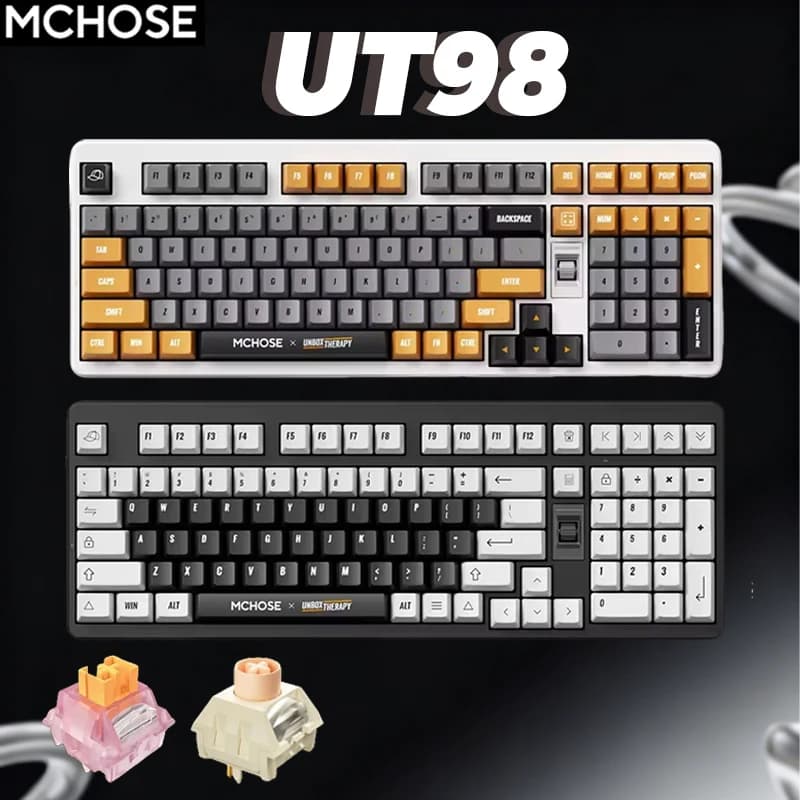
A product that meets these demanding criteria, designed to deliver a quiet and highly customizable experience suitable for both productivity and gaming, is the MCHOSE x Unbox Therapy UT98 Mechanical Keyboard. It integrates silent switches, a gasket-mount structure, and extensive wireless capabilities to provide a premium, quiet typing platform.
This keyboard combines the tactile satisfaction of mechanical switches with the acoustic discretion required for shared workspaces, all while offering modern features like RGB backlighting and full customization.
See details and current price →
Summary Checklist for a Quiet Mechanical Keyboard
- Silent Switches: Opt for linear switches with integrated dampeners.
- Internal Dampening: Look for case foam, plate foam, and gasket-mount designs.
- Wireless Flexibility: Prioritize dual-mode 2.4GHz and Bluetooth connectivity.
- Hot-Swappable: Allows for easy switch customization and replacement.
- Quality Stabilizers: Ensures large keys are stable and rattle-free.
- Durable Keycaps: PBT material offers longevity and consistent feel.
- Customization Software: For key remapping and macros to enhance workflow.
Final Prep List: Your Action Items
Before making your decision, consider these practical steps to ensure you choose the ideal quiet mechanical keyboard:
- Identify Your Typing Style: Do you prefer a light touch or a firmer press? This influences the ideal switch actuation force.
- Test Switch Samples: If possible, try out different silent linear or tactile switches on a switch tester to find your preferred feel.
- Assess Connectivity Needs: How many devices will you connect to? Is low-latency gaming a priority, or mostly productivity?
- Review Layout Preferences: Consider full-size, TKL (tenkeyless), 75%, or 65% layouts based on your desk space and number pad requirements.
- Set a Budget: While quiet mechanical keyboards can be an investment, knowing your budget will help narrow down options.
Got More Questions?
The world of mechanical keyboards, especially the quiet segment, is constantly evolving. If you have further questions about specific switch types, dampening techniques, or how to customize your keyboard for optimal silence and feel, don't hesitate to ask. We're here to help you find the perfect typing companion that enhances your productivity without disturbing anyone around you.